Showing posts with label random. Show all posts

Saturday, January 18, 2014

DIE STUPID COMPUTER!!!

I'm just about fed up with my computer. Less than 6 months ago I purchased a very expensive, top-of-the-line Alienware x51. It was just such a pretty computer, all shiny and new. Everything was so perfect...until now. In the last 3 days I've spent a grand total of 14 hours on the phone with their technical support and I'm still not quite out of the woods yet.

At first it was taking over an hour to start up the computer, and then it began crashing. I ran a diagnostic on my computer and found out that the error the hard drive was displaying actually meant that the hard drive was shot already. Apparently it had a small manufacturing error that caused it to crash. So I got a new hard drive and had a technician from Dell come by to swap it out. First off, the guy had NO IDEA what he was doing. Couldn't get the computer open, couldn't find the hard drive, just no clue. Then he finally got it swapped out and left. First problem solved!

I started everything up and immediately found out that my graphics card wasn't working any more. Yay. So I called them back and told them about my new problem. They had me take my computer apart to make sure their technician hadn't accidentally disconnected it. So I took my computer apart and found out that the technician had actually put the whole thing together wrong. The clips that held certain parts in place were all screwed up, I'm missing multiple screws, and one of the cooling fans was blocked. Weirdly enough, the graphics card was actually still connected. So then the technical support person told me that meant that my graphics card had also gone bad and they would send me a REFURBISHED one! Not a brand new one, but someone else's old one! So I got off the phone with them and looked up my problem online. Fixed it. Turned out I was missing the driver for the graphics card as Dell hadn't taken the time to download it onto my new hard drive. Second problem solved!

Then I discovered yet another problem. The eject button on the CD drive wasn't working. If I wanted to eject a CD, I had to go into the computer folder and left-click and eject it manually. This time I was smarter though. Didn't call technical support, nope. I looked it up online. Again it was a missing driver. Third problem solved! So after all that work and hours on the phone, the computer runs again.

Unfortunately, running doesn't mean it's just like it was. Since my old hard drive completely crashed, I couldn't save any of my files. The new one is a blank slate. That means I have to reinstall everything. I'm so mad that I lost all my Sim stuff. It's going to take me forever to redownload the games themselves and all of my CC! Hopefully I can get it done within a day and be back to playing soon.


Thursday, January 9, 2014

Welcome to the new world...are you ready?

Wow, where in the world did 2013 go? I got all caught up in school and haven't updated in months, and somehow the end of the year just kind of slipped by. Oops. Well I'm determined to have some fun in 2014 and The Sims will always be a part of my fun. Here's to me hopefully updating more often in this lovely new year!

Unfortunately there's a very important Simmer who's decided to call it quits this year. :( Twallan is such an amazing modder and I'm really going to miss him. He'd already announced that he wasn't going to make any mods for The Sims 4, but that really didn't matter as it's still the era of The Sims 3. However, Twallan has decided to retire sooner than that and announced a few days ago that he's retiring now. Doesn't seem like all that big a deal since there are no new EPs or SPs, but EA announced that they have at least one more patch in progress for The Sims 3 so...crap. If anything major changes with this patch, all Twallan's mods will be broken. I urge anyone who would like to keep their mods intact to turn off their automatic updates now!

--------------------------------------------------------------------------------------

So anyways, I'm kind of considering changing from Twallan's mods to AwesomeMod. I actually used to use AwesomeMod way back in the beginning of The Sims 3 era, but switched over because Twallan tended to update much more frequently than Pescado. Now I guess there's very little reason to worry about updates though since The Sims 3 era is almost over.

There's also a really big reason I'm thinking of making the change. AwesomeMod has an option to enable Sims 2-style aging, where only your active household ages. I've always missed that, and with my remodel of Sunset Valley this style of aging would be incredibly useful. That way I could age up the Sims I wanted without affecting the rest of the world. I don't like turning aging off, and I don't like missing other Sims aging up. Sims 2-style aging is really the perfect compromise for me. So I'll be mulling that over as I get everything all set up to start being active in the community once more!

Happy 2014! It's great to be back! :)

Thursday, August 1, 2013

No more burrito babies!

The greatest piece of CC ever to be released for The Sims 3 has come to my attention today. For the 1st time ever in-game, babies can have arms and legs thanks to QuizicalGin's Sleeper Footies! Goodbye burrito babies, hello normality. It's sad that somehow in the course of this wonderful game series our babies have devolved into little larvae...let's take a look.

The Sims
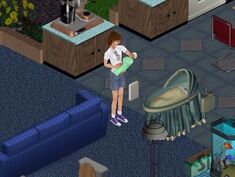
Babies were more of a object than a Sim. They were made in a weird way too, instead of woohooing Sims would kiss passionately 3 times in a row and get a pop-up asking if they would like to have a baby. It'd appear in a rain of flowers in its little bassinet. You never saw the baby unless a Sim walked over to interact with it, and then it couldn't be put down anywhere other than the bassinet or carried around. Those suckers were hard to keep too! You had maybe an hour of it crying before the social worker would call and threaten to take it away.

The Sims 2
Yay my favorite babies! These are the most realistic of all in my opinion. The little arms and legs, the diaper, the interactions...ah I miss it. They were always bald but their eyebrows reflected what hair color they'd inherited, and their eye color was an inherited feature too. And no more crib attachment! You had to buy the crib, and the babies could be put on the floor and carried around. They also could be bathed and the changing table came with the base game. Oh, and they could be interacted with by multiple adults! One would hold the baby while the other cooed at it, and they could hand the baby to each other.

The Sims 3
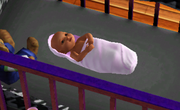
And now we devolve. Burrito babies, larvae, caterpillars...all nicknames for what EA did to the previously-adorable age. Before I could stand having a few babies in the house. They were cute. Now I skip through that particular age. What's the point? They aren't cute any more, there are less interactions, and they're just generally annoying. I was so disappointed this time around.

But now, hallelujah! Babies can have arms and legs in The Sims 3! I'm so excited for my next in-game baby. I might actually be able to stand having one in my family now. This CC gets the highest praise from me. Hopefully EA picks up on how much people hate the babies and make them much better in the future.

Saturday, June 8, 2013

Create a Plumbob

I'm really bored. My computer won't be here until June 17th, maybe a few days earlier, but that's still a week or so until I can Sim it up. It's pretty easy to tell that I'm bored too. My room is spotless, my CC has been organized, pretty much everything I could possibly do is done. Of course this had to be the worst possible time to have nothing to do too, because I'm not taking summer classes and am stuck drifting around...

But for at least a little bit I'm amused! EA put up the origami instructions on how to make your own little plumbob and it actually works. All you really need is the pattern and some tape or glue and you're ready to go. The paper plumbobs come out surprisingly realistic...or as realistic as a gaming icon could be anyways. I figured I'd share in case someone else was bored.
So have fun making your own little paper plumbob to sit on your desk, throw around, whatever you decide to do with it. At least you have a project to keep you busy for 5 minutes! The product's kinda cute too.

Monday, May 27, 2013

New computer!

So there have been several changes to my plans. I was originally going to buy a MacBook Pro with Retina Display since it could dual-purpose for both college and Sims. I really wasn't too thrilled because The Sims 3 has issues with playing on a Mac, but they're such nice computers that I just couldn't help myself. Then a miracle happened. The college I'm attending gave me a free MacBook Pro! So instead of spending my money on a laptop that had to be college-compatible, I'm now free to spend it on a purely gaming computer.

Meet the Alienware x51. Top-of-the-line gaming computer, incredibly speedy, and absolutely tiny which is perfect for college what with the moving and the sharing of small spaces. I've upgraded it and I'm in love. This thing is so powerful it'll have no problem running everything I could ever throw at it. Complete overkill I know, but I've been saving up for years to get myself a decent computer and this is what I want. Hopefully it'll still be advanced enough to handle not only The Sims 3 but The Sims 4 in its completion. I'll probably have to upgrade the graphics card halfway through The Sims 4, but everything else will hopefully be fine.

Operating System                  Windows 7 Home Premium, 64bit
Software                               Microsoft Office Home & Student 2013
Memory                                 16GB
Hard Drive                             2TB
Processor                              3rd Generation Intel Core (8M cache, up to 3.4Ghz)
Video Card                            NVIDIA GeForce GTX 660

Thursday, April 11, 2013

Finally figured out my problem!

Well I now know exactly what causes my computer to freak out and crash while playing The Sims 3. Anything involving playing with the Sims themselves makes in go into panic mode. So CAS and playing a household are no longer options which leaves...building. That's all I can do these days is build. So no more pictures of Sims, just pictures of my buildings and my favorite EP information.

--------------------------------------------------------------------------------------

I'm assuming that the Island Paradise announce trailer is now old news even though it's only a day old. It's definitely exciting news! Finally the 1st glimpse and a bunch of brand new information from just a short little video. Watch it!
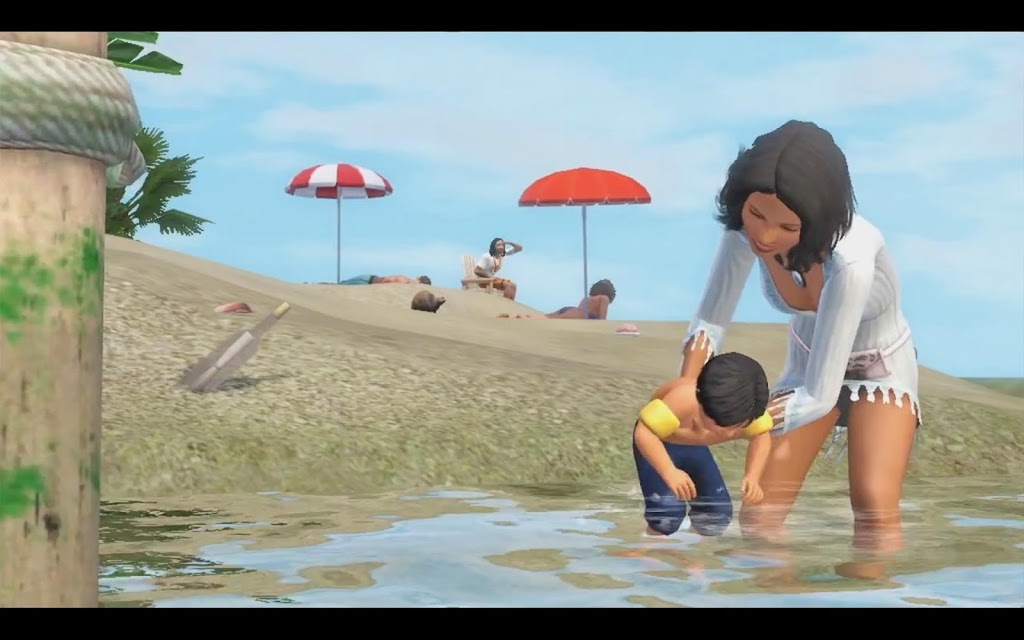
After watching that trailer there were 2 big things that were stuck in my head: mermaids and the fact that toddlers have swimming interactions! Both of which are shown clearly in the video, both of which are so dang long-awaited. Toddlers have been so left out of all the swimming activities; Generations was the hope of a kiddie pool but that definitely didn't happen. It looks like they'll finally get some action in Island Paradise since mommy can clearly be seen holding baby in the water. And mermaids make their 1st appearance too in the last few seconds of the trailer, swimming through the waves.
New lifeguard career, private island beach houses, boats of all kinds...this EP is looking better and better! Keep an eye on the date too, because a live broadcast airs on April 16th and the game will be released on June 25th. Not too far away at all. Keep your fingers crossed that EA gives out more mermaid information in the live broadcast!

Saturday, February 23, 2013

The Strangerhood: Watch it NOW!

Oh gosh, I just find so many funny things from past games. Mainly The Sims 2. So this awesome company called Rooster Teeth made a whole series using The Sims 2, but with actually people voices instead of Simlish...and it's hilarious! It's all about how these horribly stereotyped Sims wind up in a strange town with no memories of how they got there or who they are. If you're looking for a laugh, or are just really REALLY bored waiting to for that new patch to finish downloading, watch a few little episodes. They aren't long, about 4 minutes each. The 1st is a tiny bit stale but they get so much funnier! Watch the trailer:
I just like the older stuff, sometimes it's better than the newer Sims 3 stuff. And this is definitely one of the funniest little series you'll find. If you wanna watch the full series either go straight to Rooster Teeth or use their YouTube account. I'm gonna wrap this up with one of my favorite quotes from one of the episodes:

"I'm sorry Tovar but I have to agree with Sam. 
A fish needs a name. How else are you gonna indicate 
which one you wanna eat? You can't just say 'I 
wanna eat Anonymous,' I mean really!"

Tuesday, January 29, 2013

A blast from the past.

Browsing YouTube is always fun, even more so when you accidentally click an old Sims 2 trailer instead of a Sims 3 trailer. Watching all that old stuff is still fun since I actually wasn't online at that point in Sims history. Then I found the oldest of the old: the original trailer for The Sims 2, which was included in The Sims Makin' Magic. It's even funnier than I remember!
We still can't do most of that. My children can't set things on fire, there's no ceiling fan antics, I've never seen any interactions with window blinds at all, and sadly the adorable napping with your feet on another Sim's lap still hasn't appeared. And Sims definitely don't rip their tops off! Lol at least not that I know of. It makes me wonder what future Sims trailers will show us...

Sunday, January 20, 2013

More and more things to do!

I guess I'm just determined to add more and more to the pile of things on my already gigantic to-do list! And of course I really can't do much right now because of my stupid computer...but that'll be fixed in less than 4 months so I can hold on that long. It's like the light at the end of the tunnel. A brand new, top-of-the-line MacBook Pro! With an upgraded graphics card and a ridiculous amount of power. I'm pretty happy.

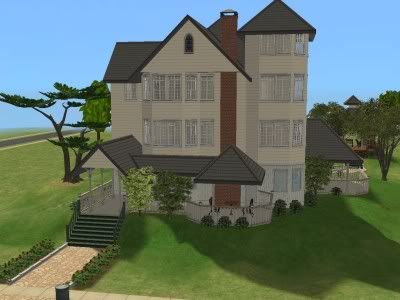
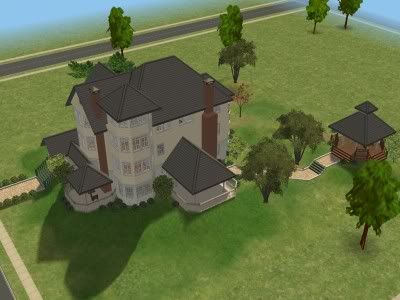
Anyways, I was flipping through all my old Sims 2 stuff and found a few pictures of Alexander Goth and how his life turned out. This was really cool to me (can't give too much away since I'm planning on writing a whole story about all that) and it made me remember the house I'd moved him into. It was the old 210 Wright Way mansion:


I'd edited the crap out of it as I usually do to any and all EA houses, but the basics stayed the same. I'm planning on beginning to build a highly similar house with my own special twists. I know people have already converted every old Sims 2 house there is, but I think everybody tends to do their own thing with their builds and that makes each one special. So I'll add my own little bits to it, upload it in case anyone wants it, and use it in the future.

To get it started I'm definitely gonna need some help building up the basic shape. To do this I'll need lots of pictures and I'm planning on using OkieOK01's pictures for that. Just wanted to share in case someone else would like to make their own version!

Thursday, November 29, 2012

More and more computer problems!

I just don't know what to do any more, I finally get rid of all the annoying in-game error codes and a few days later it starts crashing on me. No pop-up telling me why, nothing. Just a lovely crash-to-desktop every 5 minutes or so. I think my old computer may be down for the count and my Simming days may be over...at least until summer when I'll finally get that new laptop...

That means my legacy (which was finally ready to go) is paused, my house building is halted, and any pictures are just in my head. :( I'm so sad, but hopefully I'll find another quick fix and be able to play for just a little while longer until summer rolls around and I get a laptop. I'll be searching for a miracle fix...keep your fingers crossed! And any suggestions are very welcome!

Saturday, September 22, 2012

Some help with Error 16?

Well I got Supernatural a few days early and I was all excited! It even loaded faster than normal and the game didn't lag as bad as it had been before. Everything was going great and I was working on renovating an awesome little premade house and family in Moonlight Falls to play around with. Then I tried to save, after hours of work. That part didn't go so well. Error 16 popped up, and continues to pop up every time I save.

I've already tried looking it up. Everywhere I click says to just "Save As" and it'll be fine. Nope, that doesn't work at all. I've tried defragmenting my hard drive to see if that worked. Nope again. Nothing's working, and I can't play my game at all until I can save! :( If anybody could help, that'd be amazing and I'd be eternally grateful for it.

R.I.P. My little game...

Wednesday, August 15, 2012

Rolling out the welcome wagon!

Welcome to my new blog! Like the name says, this is gonna be all about my Sims. Their houses, families, any little stories I come up with...stuff like that. I do have another blog specifically for my legacy: The Conta Legacy. That one is just about the Conta family though. This one is about all my other Sims, and my game in general.

I guess I'll share a bit about my gaming situation. I was originally planning on having a nice shiny new laptop to play on, but my birthday came and went with no laptop in sight. So I'm still stuck on an old desktop which isn't exactly the best computer ever. If there are ever any blurry pictures or something that just seems wrong, that'd be why. The computer is a bit outdated lol.

Anyways, hopefully by the end of the day I'll have a few pictures and maybe a completed house to share with you all, potentially some Sims too. I'll just hafta see. :) Happy Simming everybody!